Use GitHub as asset repository for your articles (a.k.a. hot linking images to GitHub)
Use GitHub as asset repository for your articles (a.k.a. hot linking images to GitHub)
The workflow of publishing in Substack automatically from the RSS feed of a GitHub page (that I published yesterday in this article) satisfies my needs.
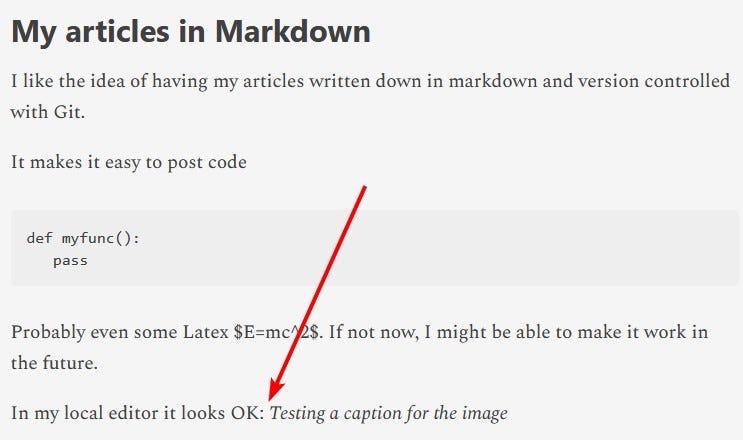
Those with a keen eye, however, might have noticed that one of the images in the article was missing in Substack:
The place of the missing image is pointed by the arrow (pointing to nothingness)
I did notice quite quickly that the image was missing from Substack; interestingly it showed on Github Pages. What a bummer, I thought. What now?
I slept it over, happy that the image failed to show in my local. That hinted to the solution.
Next day, I googled hotlinking from Imgur.
It turned out that Imgur has some restrictive policies to hotlink from blogs:
Imgur has some restrictive policies
It didn’t took me long to realize that I could host the images in a Github page. And so, I did.
I created an assets repository on my GitHub and enabled GitHub Pages:
My assets repository in Github Pages
Now, I can hotlink images from my blog (Substack, Medium, Dev.to, even GutHub pages itself) to my asset repository. For free I get version control of my assets and complete control over them (other than privacy, I guess, since it’s a public read-only repository).
I hope GitHub pages remains free forever.
A quick peek seem to point it will be free — hopefully with hotlinking — forever:
It appears GitHub Pages is remaining free — hopefully with hotlinking
However, in case it does not, it feels good to know that I have all my assets and articles locally saved and backup to the cloud.
All is about experience now a days (user experience, developer experience, etc-experience), and my current experience for image handling is not the best.
For each image in this article, I had to:
- Take a screenshot
- Save it to local directory (preferably with a “hyphened-name”)
- Add, commit and push to the repo
- Build a link to the asset..
Phew! It’s only 4 steps but for every image it’s a hassle.
So I’ll do a script to automate these tasks so I only have to 1) take screenshot 2) type regular name 3) paste into article.
I’ll share more in the near future when it get’s implemented.
Originally published at https://anrodriguez.substack.com.