
I used Python to understand how to maximize my 401(k) savings. You know what a 401(k) is, right?
Like Einstein is said to have said, “compound interest is the most powerful force in the universe.” And I’m not disagreeing with that claim.
There are many 401(k) calculators online. None were as interactive as I wanted. So, I decided to do a simple Python script to scratch my itch.
For now, this is the result. Below the code to generate the plot.
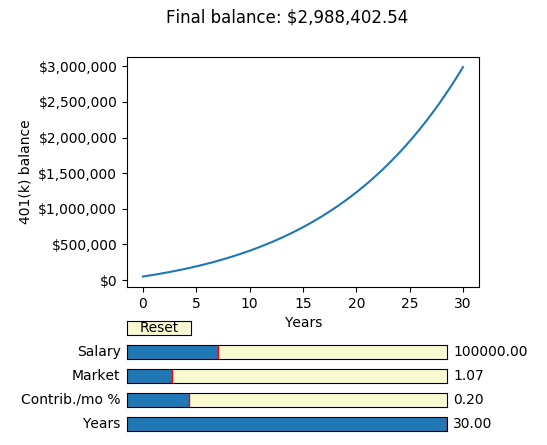
You can use the sliders to adjust different parameters, like market return and number of years you’ll be working.
In the title of the plot you can see what would you final balance in your retirement 401(k) is.
In fact, I realized that the only parameters that really count are the “total number of years investing” and the “market return”.
If you max-out your 401k year after year, your final balance doesn’t change with your salary (obviously). The maximum contribution as of 2020 is $19,500 per year.
So the factors to control are most certainly the number of years you’re chipping in into your 401(k), and the selection of stocks you make to invest.
The more time you wait before retiring the more your fund grows. This is the power of compound interest.
Another interesting factor, as many, many, many people have realized, is to invest in an index fund.
Managed funds charge fee’s. These can hinder A LOT your growth.
Index funds with a low maintenance fee (typically 0.03%, like Vanguard Vanguard S&P 500 ETF (VOO) which follows the Standard’s and Poor 500).
The S&P 500 have yielded an approximate 7% yearly. So that’s why I set the default value to that number.
Being said that there is a cap on your 401(k) tax-free savings, you should strive to invest more. Be it with a capped IRA ($6K tops) or straight in the stock market.
Currently most serious investing brokers/banks don’t charge any commision to buy/sell positions.
Here’s the script that makes an interactive plot using matplotlib.pyplot to see how a 401(k) retirement fund changes while varying some parameters:
"""
Use pyplot to plot how your 401(k) saving change with varying parameters
"""
import matplotlib.pyplot as plt
from matplotlib.widgets import Slider, Button, RadioButtons


fig = plt.figure()
plt.subplots_adjust(left=0.25, right=.8, bottom=0.4)
ax = fig.add_subplot(1,1,1)

axcolor = 'lightgoldenrodyellow'
axyears   = plt.axes([0.25, 0.1, 0.5, 0.03], facecolor=axcolor)
axcontrib = plt.axes([0.25, 0.15, 0.5, 0.03], facecolor=axcolor)
axmarket  = plt.axes([0.25, 0.2, 0.5, 0.03], facecolor=axcolor)
axsalary  = plt.axes([0.25, 0.25, 0.5, 0.03], facecolor=axcolor)
resetax = plt.axes([0.25, 0.3, 0.1, 0.03])

years = Slider(axyears, 'Years', 1, 30, valinit=30, valstep=1)
monthly_contribution = Slider(axcontrib, 'Contrib./mo %', 0.0, 1.0, valinit=0.195, valstep=0.001)
market = Slider(axmarket, 'Market', 1.0, 1.5, valinit=1.07)
salary = Slider(axsalary, 'Salary', 40000, 250000, valinit=100000, valstep=500)
button = Button(resetax, 'Reset', color=axcolor, hovercolor='0.975')

sliders = [years, monthly_contribution, market, salary]


def get_balance(
    years=30,
    salary=100000 / 12,
    monthly_contribuyion_pc = .15,
    market_growth_pc = 1.07,
    initial_balance = 50000
    ):
    total = [initial_balance]
    yearly_salary_increase = 1.03
    for m in range(1, int(years) * 12 + 1):
        contribution = salary * monthly_contribuyion_pc
        market_growth = total[-1] * (market_growth_pc**(1/12)-1)
        total.append(total[-1] + contribution + market_growth)
        if m % 12 == 0:
            salary *= yearly_salary_increase

    return total

def update(val=None):
    balance = get_balance(
        years=years.val,
        salary=salary.val / 12,
        monthly_contribuyion_pc = monthly_contribution.val,
        market_growth_pc = market.val,
        initial_balance = 50000
    )
    ax.clear()
    ax.plot([x/12 for x in range(len(balance))], balance)
    ax.get_yaxis().set_major_formatter(plt.FuncFormatter(
        lambda x, loc: "${:,}".format(int(x))))
    ax.set_ylabel('401(k) balance')
    ax.set_xlabel('Years')
    fig.suptitle(f'Final balance: ${balance[-1]:,.2f}')

def reset(event):
    for s in sliders:
        s.reset()

years.on_changed(update)
market.on_changed(update)
monthly_contribution.on_changed(update)
salary.on_changed(update)
button.on_clicked(reset)
update()
plt.show()
Although this is a simple script, I had to iron out some kinks:
This as a template for the script
This other link to know how to format the axis.
This other is for the title location in my plot.
This is my favorite 401(k) calculator, since it includes inflation. I didn’t include inflation in my script just to keep it simple.
Thanks for all of them for knowledge and inspiration.
It can be simply added as a toggle button to turn it on/off, and in the get_balance() function in the code.
Hope you have fun customizing the plot!