If you need to create a Microsoft Excel spreadsheet, it is very easy to create an htmlfile with a good ol’ and use the mso-number-format CSS attribute to format your content.
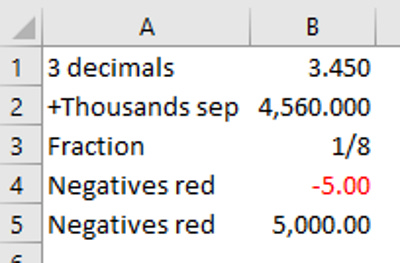
I compiled these some time ago. Below there’s an example html showing how to use these classes, and an image with the output.
Attribute Description mso-number-format:”0” NO Decimals mso-number-format:”0.000” 3 Decimals mso-number-format:”# \,# # 0.000” Comma with 3 dec mso-number-format:”mm\/dd\/yy” Date7 mso-number-format:”mmmm\ d\,\ yyyy” Date9 mso-number-format:”m\/d\/yy\ h:mm\ AM\/PM” D -T AMPM mso-number-format:”Short Date” 01/03/1998 mso-number-format:”Medium Date” 01-mar-98 mso-number-format:”d-mmm-yyyy” 01-mar-1998 mso-number-format:”Short Time” 5:16 mso-number-format:”Medium Time” 5:16 am mso-number-format:”Long Time” 5:16:21:00 mso-number-format:”Percent” Percent - two decimals mso-number-format:”0%” Percent - no decimals mso-number-format:”0.E+00” Scientific Notation mso-number-format:”\@” Text mso-number-format:”# \ ???\/???” Fractions - up to 3 digits (312/943) mso-number-format:”\0022£\0022# \,# # 0.00” £12.76 mso-number-format:”# \,# # 0.00_ \;[Red]-# \,# # 0.00\ “ 2 decimals, negative numbers in red and signed (1.56 -1.56)
Example html content. Save the following content as myfile.xls :
<html>
    <head>
        <style>
            td.three-decimals {mso-number-format: "0\.000"}
            td.thousands-separator {mso-number-format: "\# \,\# \# 0\.000"}
            td.fractions {mso-number-format: "# \ ???/???"}
            td.negative-red {mso-number-format: "# ,## 0.00_ ;[Red]-# ,## 0.00\ "  }
        </style>
    </head>
    <body>
        <table>
            <tr>
                <td>3 decimals</td>
                <td class="three-decimals">3.45</td>
            </tr>
            <tr>
                <td>+Thousands sep</td>
                <td class="thousands-separator">4560</td>
            </tr>
            <tr>
                <td>Fraction</td>
                <td class="fractions">0.125</td>
            </tr>
            <tr>
                <td>Negatives red</td>
                <td class="negative-red">-5</td>
            </tr>
            <tr>
                <td>Negatives red</td>
                <td class="negative-red">5000</td>
            </tr>
        </table>
    </body>
</html>
When you open the myfile.xls (in whatever version of MS Excel) you should see the cells formatted as intented. Image below.
Notice how cool that the value 0.125 has been converted to its fractional representation!